 Norvane Systems
What Unhaste adds
Opal is built around blocking: schedules, limits and focus sessions. Unhaste does that too, and adds an evening built for the hour that’s hardest to get back, the one before bed.
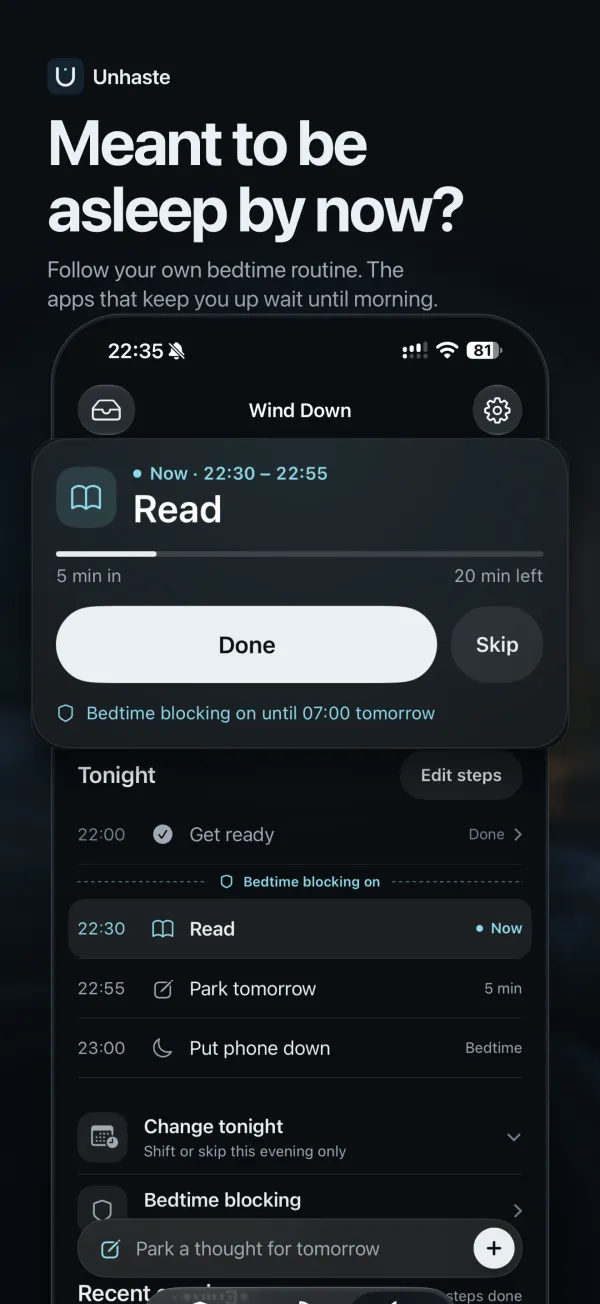
- A bedtime routine, step by step. Build your evening from steps like a shower, skincare and reading. Unhaste chimes softly as each one starts and shows tonight’s step on your Lock Screen.
- Blocking that starts with your routine. Bedtime blocking switches off the apps that keep you up at the step you choose, and keeps them off until morning.
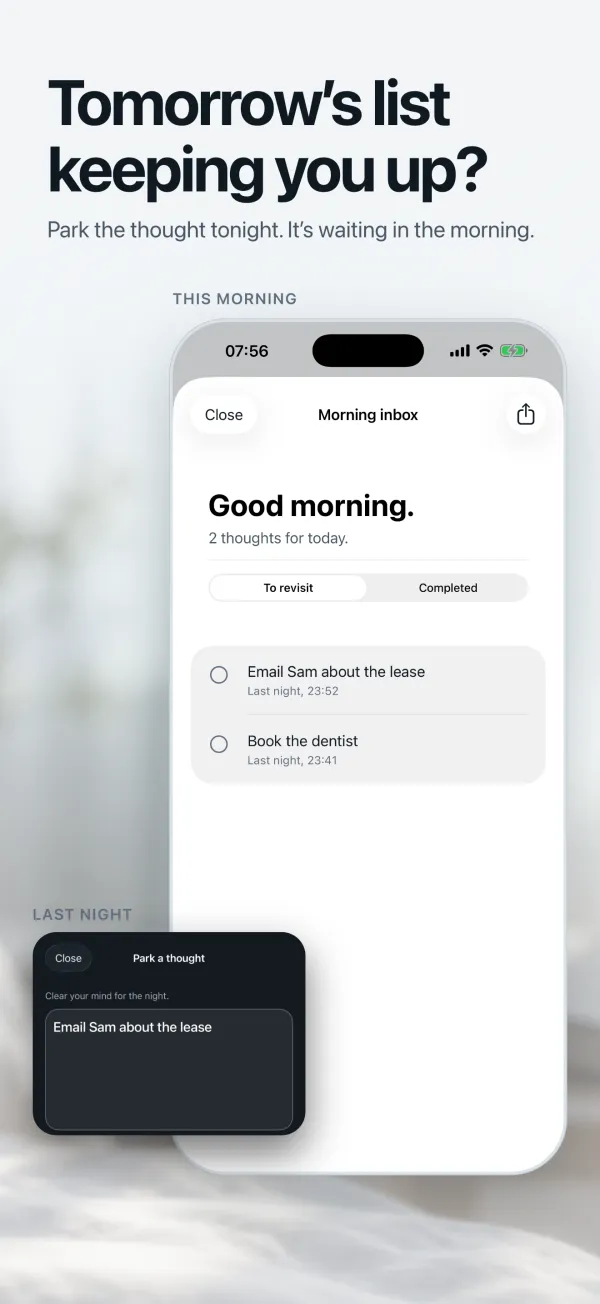
- A place for tomorrow’s thoughts. Park a thought before bed, even while apps are blocked, and find it waiting in your morning inbox.
- No account. There’s nothing to sign up for, and your routines and notes are stored on your iPhone.
- No scores or leaderboards. No streaks to keep and nothing to lose. Unhaste shows you where your time went, without grading it.
The blocking you’re used to
Open limits, daily time limits, scheduled blocks, focus sessions and website blocking are all here, so you can set up the rules you rely on in Opal in a few minutes. See every way Unhaste blocks apps.
Unhaste vs. Opal at a glance
| Feature | Unhaste | Opal |
|---|---|---|
| Limit how many times an app opens | Yes | Yes |
| Daily time limits | Yes | Yes |
| Scheduled blocking | Yes | Yes |
| Focus sessions that block apps | Yes | Yes |
| Website blocking | Yes | Yes |
| Bedtime routine with a reminder for each step | Yes | Not listed |
| Blocking that starts at a step of your routine | Yes | Not listed |
| Morning inbox for thoughts parked at night | Yes | Not listed |
Based on each app’s App Store listing in November 2026. Opal is a trademark of its owner, and Unhaste isn’t affiliated with Opal.
How to switch from Opal
- Download Unhaste and allow Screen Time access.
- Recreate your Opal blocks: pick the apps, then choose a few opens a day, a daily time limit or set hours.
- Set your bedtime, add a few evening steps, and turn on Bedtime blocking.
- Turn off Opal’s blocks, so two apps aren’t blocking the same things.
Questions and answers
Is Unhaste a good alternative to Opal?
If your phone keeps you up at night, yes. Unhaste has open limits, daily limits, schedules and focus sessions, and adds a step-by-step bedtime routine, Bedtime blocking and a morning inbox for tomorrow’s thoughts.
Does Unhaste need an account?
No. There’s no sign-up. Your blocks, routines and notes are stored on your iPhone.
Can I use Unhaste and Opal at the same time?
You can, but two blockers can overlap in confusing ways. Once your Unhaste blocks are set up, we suggest turning off Opal’s.